The Easy Button for Internal Network Access
Why EDR just isn’t enough

Threat Actor Imagined
I want you to take a second and think about what you envision when the term hacker is utilized. Was it something like this?
Someone sitting in a dark room with a hood over their head, spending months developing exploits to abuse vulnerabilities in systems, and writing complex scripts to break into your network while exclaiming “I’m in!” Inserting Hollywood command here:
While threat actors do abuse vulnerabilities, write complex scripts, and some attacks can span months; The majority of attacks don’t involve much exploitation of vulnerabilities, don’t require much more than software pre-loaded on your machine, or a simple tool that is easily downloaded from the internet and it doesn’t really take that long after initial access to exfiltrate data and ransomware you.
One thing that we have learned is attackers are lazy and their bots are not sophisticated. They’re looking for an easy button that will get them into your internal network. Here is what that looks like.
The Reality
The majority of attacks that Scinary’s IR team have worked in the last four years and even the ones we hear about from colleges in the industry, start with a VPN account compromise, which progresses to having some sort of remote management and monitoring tool (AnyDesk, Atera, ScreenConnect, etc.) installed for persistence. Then, if the VPN account that the threat actor has isn’t already a Domain Administrator, they dump active directory credentials and crack them to get privileged access.
The majority of attacks that Scinary’s IR team have worked in the last four years and even the ones we hear about from colleges in the industry, start with a VPN account compromise, which progresses to having some sort of remote management and monitoring tool (AnyDesk, Atera, ScreenConnect, etc.) installed for persistence. Then, if the VPN account that the threat actor has isn’t already a Domain Administrator, they dump active directory credentials and crack them to get privileged access.
This type of attack is not sophisticated. Typically, the compromised VPN account came from an old-school brute-force attack or password spray, using a list of compromised credentials purchased on the dark web. Then, if that account happens to be a high-level account, the threat actor already has all they need to facilitate a ransomware attack. At most, the attacker may have to run some recon within the environment by using tools like Nmap or Angry IP Scanner to identify potential endpoint targets. This is truly the easy button for accessing your internal network. Again, no crazy vulnerability exploits, no need for fancy scripts. This can be done by anyone with a keyboard and some basic understanding or an AI subscription.
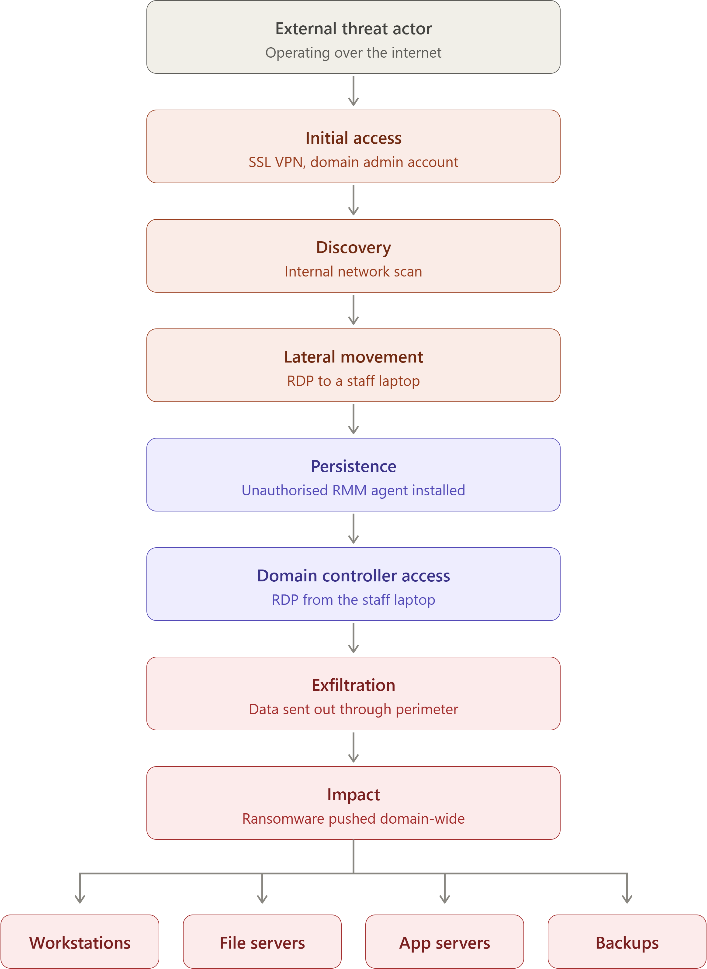
Then, there is another issue with all of these steps: if you are just running EDR, you may never see any of the threat actor activity. The firewall VPN compromise is an identity issue on a device which is often unsupported by EDR. The network scan, while some EDR may flag this, it most likely won’t trip a detection signal, due to the prevalence of it within IT administration. The RMM tools are legitimate administrative tools and are likely not to get flagged either. It’s not until the threat actor goes to run scripts or download malware that an EDR tool would begin to sound off.
There is a deeper problem too. The EDR agent runs on a device the threat actor now controls, and reports to a console using credentials that device holds. Further, the source of the malicious activity, the sensor watching it, and the channel carrying that telemetry to the cloud all sit on the same side of a trust boundary the attacker already owns. Attackers know this. Tampering with or disabling the agent is a standard step in the playbook, and we see it regularly. A control that an attacker can switch off from inside is not a control you can build a detection strategy around by itself.
Meaning, identification at this phase of the kill chain is too late!
None of this required a zero-day, a custom implant, or months of preparation. It required a password, a login page, and built-in tools. That’s the easy button, and it’s still sitting there on most networks.
Our Recommendations
- Ensure multi-factor authentication on all VPN accounts
- Ensure proper configuration of LDAP, RADIUS, and OAuth, for VPN accounts
- Audit VPN accounts
- Limit VPN internal network access via policies
- Configure notifications for VPN tunnel ups
- Move to IPSec VPN
- Prohibit Shared accounts for both internal staff and third-party providers
- Utilize Next-Generation Firewall Features to Block unauthorized RMMs
How Scinary Helps
This is a case for defensive layers. If the attacker controls the endpoint, then detection needs to happen somewhere they don't control and every step in this chain crosses the network. The recon scans touch your entire environment. The RMM tool has to open an outbound TCP connection. The lateral movement is, by definition, network traffic. An attacker can silence an agent on a laptop. Silencing a network sensor, on its own dedicated hardware, is a much harder task to accomplish.
That’s why we have our Centurion Network Detection & Response platform. Which provides a robust network detection, along with passive recon protection through a canary system and a Windows server log agent, it’s built to cover the areas not seen by EDR. All managed by our around the clock security operations team.
All of these steps outlined above baring the initial VPN account comprise have required some sort of internal network communication by the threat actor. The recon scans hit your entire network, the RMM tool has to establish a TCP connection outbound, and the lateral movement by its very nature is on the network. We know the attacker’s playbook, so we have built out ours to counter it. Each one of these signals kick off an alert and even though I said the initial VPN compromise happened outside of the internal network, we even have ways to detect that with Scinary Connect our XDR upgrade for Centurion. Which allows us to pull in telemetry from the firewall to detect this very issue.
Below, you can see a comparison of endpoint visibility versus network visibility.
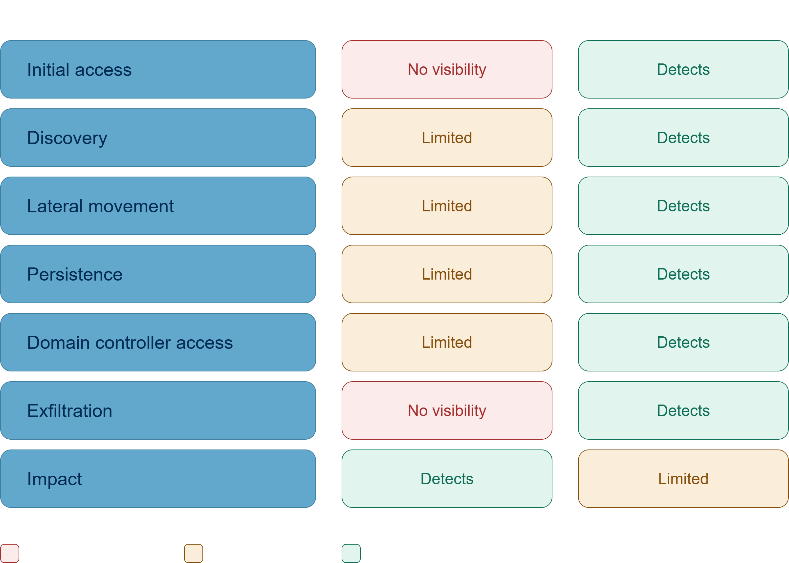
We also run firewall configuration assessments for all of our clients to ensure the above recommendations are implemented, and we can also do firewall management for FortiGate which provides our 24/7/365 SOC team the ability to manage and monitor this critical component and takes the headache away from you!
If you would like to know more about our recommendations or our services, please fill out the contact form and let us know how we can help!