CENTURION XDR UPGRADE

Scinary Connect

Centurion visibility, beyond the network.

Scinary Sign

Your network ends at the firewall. Your users don't. Scinary Connect brings your cloud accounts, firewalls, and endpoints into Centurion, so the team already watching your network can see and stop threats wherever they start.
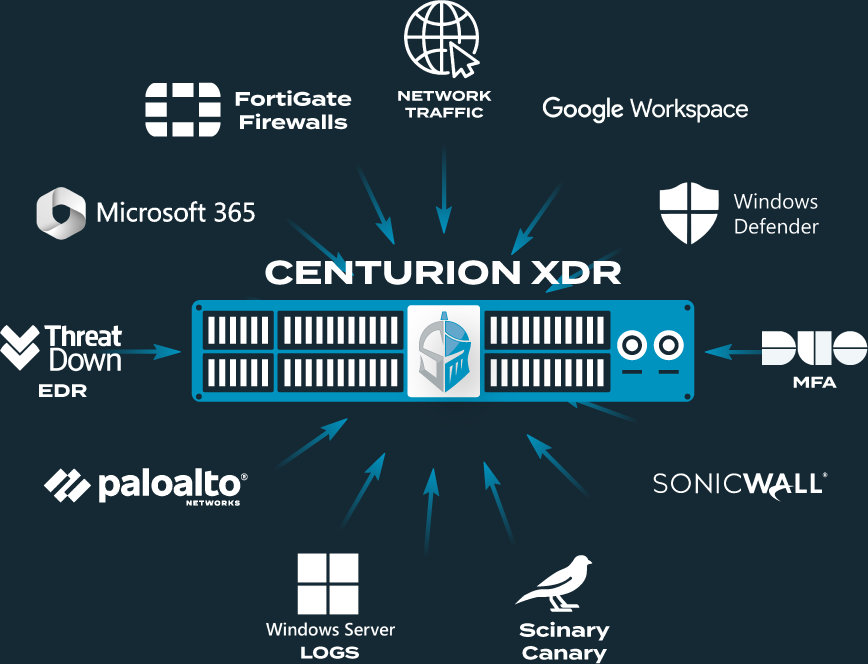
Scinary Connect Inputs Comparison Graphic

Attackers Don't Break In. They Log In.

Stolen logins and exposed remote access are the two most common ways attackers get in. Both sit outside your network.

Hosted Identity

Your logins live in Microsoft and Google now, and so do the attackers trying to steal them.

Remote Access

VPNs and firewalls are the front door, and they keep a log of everyone who knocks.

Stolen Login? We Log Them Out.

Compromised cloud accounts are one of the most common incidents we see. With Scinary Connect, our analysts don't just alert you. They act, ending the attacker's sessions and disabling the compromised account in Microsoft 365 or Google Workspace. Then you get a call from someone who already knows what happened.

Suspicious Sign-In Detected

Analyst Verifies

Sessions Ended & Account Disabled

You Get The Call

One Platform. One Team. Every Signal.

Step 1

We Connect Your Sources.

Your cloud, firewall, and endpoint logs flow into Centurion.

Step 2

We Add Context

Every event is enriched with threat intelligence about where it came from.

Step 3

Our Team Acts

Our 24/7/365 US-based SOC responds around the clock.

The Scinary Connect Catalog

Identity & Cloud

Stop stolen logins before they become breaches.

Google Workspace Logo
Microsoft 365 Logo
Duo Green Logo

Firewalls

Your firewall sees everything coming in. Now so do we.

Fortinet Logo
Sonic Wall Logo
Palo Alto Networks Logo

Endpoint

Endpoint activity, correlated with everything else.

Threatdown Logo
Windows Defender Logo

Focused Logging, Not a Thousand Integrations

Some providers advertise integration counts. We don't. Every source in our catalog earned its place because we've watched attackers abuse it. Fewer, better signals mean faster answers, and less noise for your team.

One Purchase. The Full Catalog.

Every current integration. Every future one. One line on your quote.

Typical XDR Add-On Scinary Connect
New Integrations Often priced per connector or tier Included
Who Responds Alert sent to a queue Our SOC analysts act

New Integrations

Typical XDR Add-On

Often priced per connector or tier

Scinary Connect

Included

Who Responds

Typical XDR Add-On

Alert sent to a queue

Scinary Connect

Our SOC analysts act

Built on Centurion.

Scinary Connect upgrades Centurion NDR to XDR. Not on Centurion yet?

Frequently Asked Questions

Do I need Centurion to use Scinary Connect?

Yes. Scinary Connect upgrades the Centurion NDR platform to XDR. It isn't a standalone product.

How is Scinary Connect priced?

For education institutions, Scinary Connect is priced in tiers based on student enrollment. For all other organizations, pricing is based on staff count. Every tier includes the full integration catalog.

What permissions do you need in our Microsoft 365 or Google Workspace tenant?

You'll need access to a Global Admin account (Microsoft 365) or a Super Admin account (Google Workspace) to authorize Scinary Connect.

How will I know when new integrations are added?

We keep clients updated on new integrations through our newsletters, blog posts, conferences, and regular account management calls.

Can my team see Scinary Connect alerts?

Scinary Connect alerts run on a separate system from Centurion NDR and go directly to the Scinary SOC team, who triage and act on them.

Does Scinary Connect provide email security?

No. Scinary Connect's primary function is responding to identity-based threats. It sees only limited email information in Microsoft 365 and no email information in Google Workspace.